

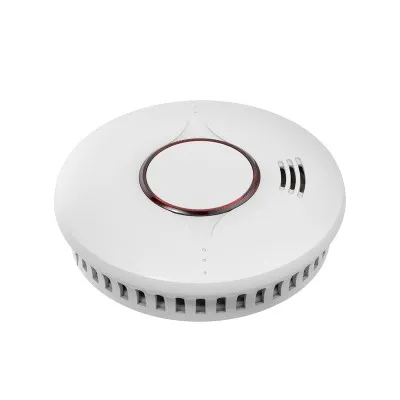




Cleaning a smart heat detector is a crucial maintenance task that ensures its optimal performance and reliability. As a supplier of smart heat detectors, I understand the importance of proper cleaning and maintenance to extend the lifespan of these devices and keep them functioning effectively. In this blog post, I will guide you through the process of cleaning a smart heat detector, providing you with step-by-step instructions and useful tips.
Why Cleaning a Smart Heat Detector is Important
Smart heat detectors are designed to detect abnormal temperature increases in the environment and trigger an alarm to alert occupants of a potential fire hazard. Over time, dust, dirt, and other debris can accumulate on the detector's sensors and components, which can interfere with its ability to accurately detect heat. This can lead to false alarms or, worse, a failure to detect a real fire. Regular cleaning helps to remove these contaminants and ensures that the detector remains sensitive and reliable.
Types of Smart Heat Detectors
Before we dive into the cleaning process, it's important to understand the different types of smart heat detectors available. At our company, we offer a range of smart heat detectors, including Mains Power Heat Detector With Battery, Wireless Heat Detector, and Intelligent Heat Detector. Each type has its own unique features and cleaning requirements, but the general cleaning principles remain the same.
Tools and Materials Needed
To clean a smart heat detector, you will need the following tools and materials:
- Soft, dry cloth
- Compressed air canister
- Mild detergent (optional)
- Water
- Ladder or step stool (if the detector is installed high on the ceiling)
Step-by-Step Cleaning Process
Step 1: Turn Off the Power
Before you start cleaning the heat detector, it's essential to turn off the power to the device. This will prevent any electrical shock and ensure your safety. If the detector is connected to a mains power supply, switch off the circuit breaker or unplug the device from the outlet. If it's a battery-powered detector, remove the batteries.
Step 2: Remove the Detector from the Mounting Bracket
Most smart heat detectors are designed to be easily removable from their mounting brackets. Carefully twist or unclip the detector from the bracket and place it on a stable surface.


Step 3: Clean the Exterior
Use a soft, dry cloth to gently wipe the exterior of the detector. This will remove any dust or dirt that has accumulated on the surface. Pay special attention to the areas around the sensors and the alarm indicator. If there are any stubborn stains or marks, you can dampen the cloth slightly with a mixture of mild detergent and water. Make sure to wring out the cloth thoroughly to avoid getting any moisture inside the detector.
Step 4: Clean the Sensors
The sensors are the most critical components of the heat detector, so it's important to clean them carefully. Use a can of compressed air to blow away any dust or debris that may have accumulated on the sensors. Hold the canister about 6 inches away from the sensors and spray in short bursts. Avoid using excessive force, as this could damage the sensors.
Step 5: Check the Alarm Indicator
The alarm indicator is a small light or LED that illuminates when the detector is triggered. Check the indicator to make sure it is clean and functioning properly. If the indicator is dirty, use a soft, dry cloth to gently wipe it clean.
Step 6: Reinstall the Detector
Once you have finished cleaning the detector, carefully reinstall it on the mounting bracket. Make sure it is securely attached and properly aligned. If it's a battery-powered detector, insert the batteries.
Step 7: Restore the Power
If the detector is connected to a mains power supply, switch on the circuit breaker or plug the device back into the outlet. If it's a battery-powered detector, make sure the batteries are properly installed.
Step 8: Test the Detector
After reinstalling the detector and restoring the power, test it to make sure it is functioning properly. Most smart heat detectors have a test button that you can press to trigger the alarm. Press the test button and listen for the alarm sound. If the alarm does not sound, check the batteries or the power supply. If the problem persists, contact a professional technician for further assistance.
Tips for Cleaning Smart Heat Detectors
- Clean regularly: It's recommended to clean your smart heat detectors at least once every six months to ensure optimal performance. However, if you live in a dusty or dirty environment, you may need to clean them more frequently.
- Avoid using harsh chemicals: Harsh chemicals can damage the detector's sensors and components. Stick to mild detergents and water when cleaning the exterior of the detector.
- Do not submerge the detector in water: Smart heat detectors are not waterproof, so do not submerge them in water. If the detector gets wet, dry it thoroughly before reinstalling it.
- Follow the manufacturer's instructions: Always refer to the manufacturer's instructions for specific cleaning and maintenance guidelines. Different models may have different cleaning requirements.
Conclusion
Cleaning a smart heat detector is a simple yet important maintenance task that can help to ensure its reliability and performance. By following the steps outlined in this blog post and using the right tools and materials, you can keep your smart heat detectors clean and functioning properly. If you have any questions or need further assistance with cleaning or maintaining your smart heat detectors, please do not hesitate to contact us. We are a leading supplier of smart heat detectors and are committed to providing our customers with high-quality products and excellent customer service. Whether you are looking for a Mains Power Heat Detector With Battery, Wireless Heat Detector, or Intelligent Heat Detector, we have the right solution for your needs. Contact us today to discuss your requirements and start the procurement process.
References
- NFPA 72: National Fire Alarm and Signaling Code
- Manufacturer's instructions for smart heat detectors


