

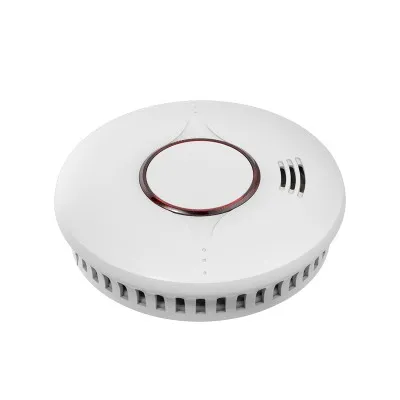




As a supplier of Smart Smoke Detectors, I understand the importance of ensuring these life - saving devices work flawlessly. Testing a smart smoke detector is a critical process that can help prevent potential disasters. In this blog, I'll share a comprehensive guide on how to test a smart smoke detector effectively.
Pre - test Preparations
Before starting the testing process, it's essential to gather the necessary tools and understand the detector's basic components. You'll need a ladder if the detector is installed on a ceiling, a soft cloth for cleaning, and the user manual that came with the Smart Fire Detector. The manual provides detailed information about the specific model, including its features, functions, and testing procedures.
Inspect the detector visually. Look for any signs of physical damage, such as cracks in the casing or loose wires. A damaged detector may not function correctly, and in such cases, it should be replaced immediately. Also, check if the detector is clean. Dust and debris can accumulate over time and interfere with the detector's sensors. Use a soft cloth to gently clean the exterior of the detector.
Initial Power and Connectivity Check
Most smart smoke detectors are either battery - powered or hard - wired with a battery backup. If it's battery - powered, ensure that the batteries are fresh and properly inserted. Replace the batteries if they are low or expired. For hard - wired detectors, check the electrical connections to make sure they are secure.
Smart smoke detectors often connect to a home network, either via Wi - Fi or other wireless protocols. Check the connectivity status. On the detector, there are usually indicator lights that show whether it's connected to the network. If the detector is not connecting, refer to the user manual for troubleshooting steps. This may involve resetting the detector, checking the network settings on your router, or entering the correct Wi - Fi password.
Manual Test Button
One of the simplest ways to test a smart smoke detector is by using the manual test button. On the front or side of the detector, there is a clearly marked test button. Press and hold this button for a few seconds. The detector should emit a loud, distinct alarm sound, and if it's a smart detector, it may also send a notification to your connected device, such as a smartphone or tablet.
If the alarm doesn't sound when you press the test button, there could be several issues. First, check the power source again. It could be a dead battery or a problem with the electrical connection. If the power is fine, the detector may be faulty, and you should contact the manufacturer for further assistance.
Smoke and Heat Simulation Tests
Manual test button tests are a basic check, but they don't fully simulate a real - life fire situation. For a more comprehensive test, you can perform smoke and heat simulation tests. However, these tests should be done with extreme caution.
Smoke Simulation
There are commercial smoke test sprays available in the market. These sprays are designed to produce a non - harmful, artificial smoke that can trigger the smoke detector. When using a smoke test spray, follow the instructions on the product carefully.
Stand on a ladder and position the spray about 6 - 12 inches away from the detector's intake vents. Spray the smoke gently towards the vents. The detector should sense the smoke within a few seconds and trigger the alarm. If it doesn't, the detector may be malfunctioning.
It's important to note that using real smoke from a fire or a burning object is extremely dangerous and should never be done. Real smoke can cause a fire, and it may also damage the detector and your home.
Heat Simulation
Some smart smoke detectors also have a heat sensor. To test the heat sensor, you can use a hair dryer. Set the hair dryer to a low - heat setting and hold it about 12 - 18 inches away from the detector. Move the hair dryer in a circular motion to evenly distribute the heat.
The detector should sense the increase in temperature and trigger the alarm within a reasonable time frame. If the heat sensor doesn't respond, it could be a sign of a problem with the detector.
Testing the Notification Features
One of the key advantages of a Smoke Detector Intelligent is its ability to send notifications to your connected devices. When you perform the manual test or the smoke/heat simulation tests, make sure that you receive a notification on your smartphone or tablet.
Check the settings on your connected device to ensure that the notifications are enabled for the smart smoke detector app. Also, check the app to see if the detector is correctly paired with your device. If you don't receive the notifications, try restarting the app, the detector, and your connected device.
Testing Wireless Interconnection
Many smart smoke detectors support wireless interconnection, which means that if one detector senses smoke or heat, all the interconnected detectors in the house will sound the alarm. This is a crucial feature as it ensures that you are alerted no matter where you are in the house.
To test the wireless interconnection, perform a test on one detector using the manual test button or a smoke/heat simulation. The other interconnected detectors should also sound the alarm simultaneously. If they don't, check the interconnection settings on each detector. Make sure that they are all on the same network and properly paired.


Regular Testing Schedule
Testing your smart smoke detector regularly is essential for its proper functioning. It is recommended to test the detector at least once a month using the manual test button. Conduct a more comprehensive smoke and heat simulation test at least once a year.
Keep a record of the test results. Note down the date of each test, whether the detector passed or failed, and any issues that were encountered. This record can be useful for maintenance and can also help you determine when it's time to replace the detector.
Conclusion
Testing a smart smoke detector is a multi - step process that requires attention to detail and safety precautions. By following the steps outlined in this blog, you can ensure that your Wireless Interconnected Smoke Alarms are in good working condition and ready to protect you and your family from the dangers of fire.
If you are in the market for high - quality smart smoke detectors or have any questions about testing or maintaining them, feel free to reach out to us. We are here to provide you with the best products and support to keep your home safe.
References
- National Fire Protection Association (NFPA). "NFPA 72: National Fire Alarm and Signaling Code."
- Manufacturer's user manuals for smart smoke detectors.


